Building a Claude Skill isn't really a technical job. In practical terms, the file itself is a folder and a short Markdown document. The tricky part of building a skill is judgment: deciding which task deserves to be a skill and describing it so the agent reaches for it at the right moment.
So, you probably already have a skill written somewhere in your AI chats. Depending on the task, you might find yourself repeating the instructions frequently, when you could package them once and have AI execute the same guidelines every time.
Key takeaways
- A skill is task-scoped onboarding, something that's not a persona or a role, and not knowledge the agent needs on every request.
- SKILL.md requires only two fields to trigger:
nameanddescription. Everything else is additional and makes the skills more powerful.
Note
Prompt: Teach me skills by building one in front of me. Draft a small example now — turning rough notes into a tidy one-page summary — and show exactly what the skill captures: the steps, the format, the rules you’ll follow the same way every time. Then ask which task I actually repeat each week, rewrite the skill for that, and test it with me on one real example before saving it.
- The description is the trigger. If it doesn't match the request, the skill never loads (though extended thinking modes and models might reason to search skills anyway)
- Skills come in two shapes: workflow (a procedure to run) and reference (knowledge to consult).
- Keep SKILL.md short. Push depth into referenced files that load only when the task requires them, so you can preserve context.
- One skill, one job. The skills you decide not to write matter as much as the ones you do.
What is a Claude Skill, and what tasks should you make one for?
A skill teaches an agent something it can't handle from general training alone. Before you write one, the useful question is whether the task is a sometimes, specific need, because that's the best kind of task a skill is for. The section below on writing the description explains why that distinction matters.
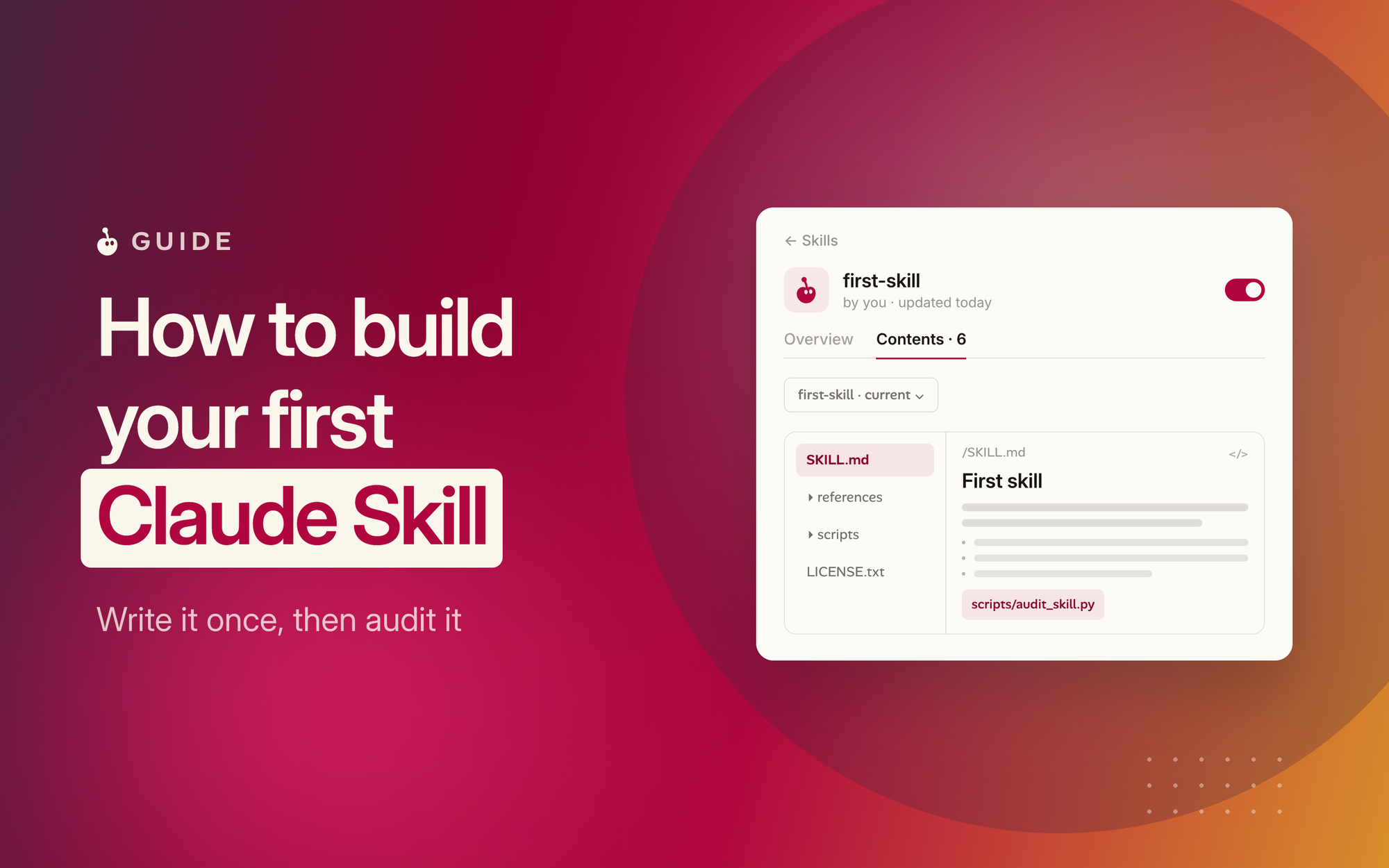
- A skill is a small folder named after one task, holding a
SKILL.mdfile and any references, scripts, or templates that task needs. - A skill is not a persona. "Be a helpful assistant" isn't a skill; skills are scoped to a single job, not a general character.
- A skill is not always-on knowledge. Anything that must appear in every response—brand colors, a default language—belongs in project-level knowledge instead.
Note
- The retrieval test decides existence. A skill is surfaced by matching its description to the request. If the two wouldn't cleanly match, the skill will rarely load.
- Good candidates are tasks that repeat: internal workflows unique to your business, proprietary schemas the agent can't guess, patterns you find yourself correcting frequently.
- Poor candidates waste the format: things the base model already does well, one-off tasks you'll never repeat, or a group of unrelated tips that should be separate skills.
How do you write the SKILL.md file correctly?
The whole file opens with a short block of YAML frontmatter, and two lines in that block carry most of the weight. Get the naming and the description right and the rest of the file has room to be simple.
- Start with frontmatter. A few lines of YAML at the top, holding
nameanddescription— the main two required fields. - Treat the description as the highest-leverage line in the file. It has one job: say what the skill does and when to use it.
- Write triggers, not adjectives. Include the concrete phrases a user might actually say: "when the user uploads a PDF," "when a request mentions refunds," because those are what the matcher catches.
- Aim for roughly 20 to 300 characters and name the real nouns of the domain.
How do you structure the body?
After the frontmatter, the body is plain markdown, and you're writing it for a future agent. Short sections, and concrete rules keep the agent on-task.
- Decide what type of skill is it. A skill either captures a procedure to run (workflow) or knowledge to consult (reference). Many are both, and that's fine, as long as the headings make the direction clear to the agent.
- For a workflow skill, write ordered steps. Number them, add checkpoints, and keep the sequence explicit: create the record, send the email.
- For a reference skill, write what the agent can't guess: schemas, naming conventions, approved legal language, the vocabulary specific to your desired output.
- Show, don't just tell. One short, complete example of the correct output is worth more than a paragraph describing it.
How do you test your skill and put it to work?
Testing a skill means checking two different things: that it loads when it should, and that its instructions deliver on its instructions. The output of an agent using different models varies, so a skill that looks right on the page can still misfire in practice, which is why you discern outputs regularly.
- Draft against a checklist: name follows the regex, description names both what-it-does and when-to-use, the body has a clear "When to use" section.
- Test the description across varied phrasings. Create a new Project with Haiku as the model and test the triggers in separate chats to see how they trigger.
- Read the skill body for AI slop. Every instruction should earn its place.
- Run a structural check before shipping. A rule-based grader or a plain checklist catches the common gaps.
- Treat the first version as a draft. Ship it, watch it meet real requests, and refine the description and rules from what you see.
- Own the result. The skill is yours to review and correct. The agent runs it; the judgment behind it stays with you.
Conclusion
The mechanics of a Claude Skill are genuinely small—a folder, a file, and a set of references it can rely on when producing the output. Ultimately, your judgment is everything: deciding what deserves to be a skill, and describing it precisely enough that the agent reaches for it at the right moment.
So start where the work already is. Notice the task you keep re-explaining to your AI—the instructions you paste again and again. Write that down as a name, a description, and a short body, and you've built your first skill.
You could also using this prompt to ask Claude to teach you how
Note
Related
- For a deeper dive into SKILLS, I recommend reading https://agentskills.io/home
- Introduction to Agent Skills
- Claude Skills Course by Anthropic
Questions people ask
SKILL.md file that teaches an agent how to handle one specific task. It's surfaced when its description matches what you're asking for — think of it as onboarding for a single job, not a plugin or an app.name and description, followed by a markdown body. The body holds your rules, steps, or reference material, structured for an agent to read quickly.